CygNet Domain Connection Utility Tasks
Contact your CygNet system administrator for a list of Domain IDs and ARS addresses on those domains in your system.
Note: These domain connection tasks require administrator-level permission (Run as Administrator) to complete. Standard users can only view Domain ID details. See CygNet and User Account Control for more information.
To Add a Domain ID to the Client Computer
When you add a new Domain ID to the client computer it is automatically set as the Default Domain.
- Click Add.
- In the Domain ID box, type the domain identifier.
- Optionally, specify one or more Preferred ARS Address(es) or a Forced ARS Address.
- Click OK.
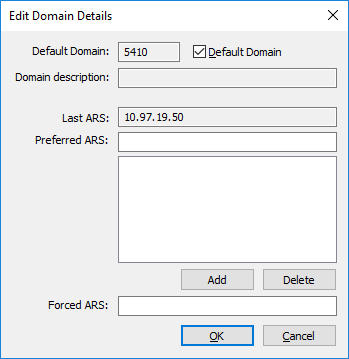
To Edit (or View) the Preferred or Forced ARS Address for a Domain ID
A Forced ARS Address takes precedence over a Preferred ARS Address. Use only one of these options. You must be a member of the Administrators group on the computer to add a Preferred or Forced address.
- Highlight the Domain ID in the list.
- Click Edit. (A standard user will be able to view Details only)
- Enter a new address(es). Or, to remove an address, highlight the address and press the Delete key.
- Click OK.
- Confirm the change.
To Delete a Domain ID
- Highlight the Domain ID in the list.
- Click Delete.
- Confirm the deletion.
To Test the Connection to an ARS
- Click Test Domain.
- In the Domain ID box, select the Domain ID on which to test the connection.
- To have the utility search the domain for an ARS, click Search for ARS. This sends out a broadcast on the domain. If an ARS responds to the broadcast, the IP address of the ARS will be shown in the IP Address box.
- If you do not want to use the search or the search is not successful, type the IP address of an ARS on the domain in the IP Address box and click Connect to Address. If the connect is not successful, verify the Domain ID and the IP addresses of the ARS’s on the domain.
- Click Done.

Errors
- If you get a -12 error, an ARS could not be found on the domain.
- If you get a -20 error, an ARS could not be found on the specified domain and IP Address.
- If you get a -14 error, an ARS is running on the specified domain but not at the IP Address.
To Set a Domain ID as the Default
You must be a member of the Administrators group on the computer to change the Default Domain.
- Highlight the Domain ID in the list and click Set Default; or
- Highlight the Domain ID in the list and click Edit. Click to check the Default Domain option then click OK.


